Drop your clips in — or paste a YouTube link and pull the video straight down. Cut it, colour it, mix the sound, export an MP4. Nothing is uploaded: your footage stays on your machine.
All of these come straight out of the automated tests that drive the editor, so they always show the current build.
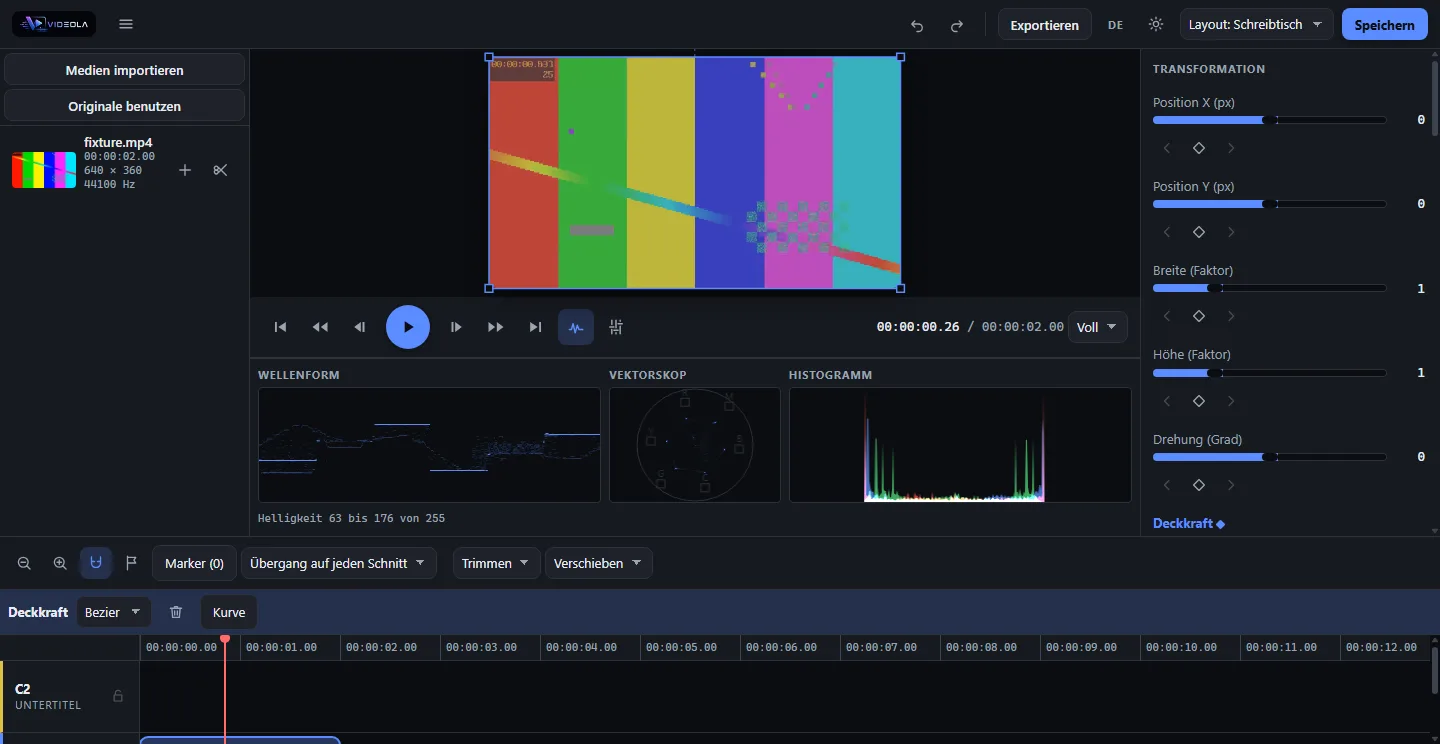
Colour, with the scopes right thereCurves, colour wheels and your own LUTs, and a waveform, vectorscope and histogram that follow the frame you are on. The box on the picture is the clip itself — drag it, scale it, turn it.Pick an effect by looking at itEvery tile shows your own frame with that effect applied. Sixteen effects, seven transitions, and you can put a transition on every cut at once.Titles and lower thirds, ready to goFifteen templates: lower thirds, countdowns, picture-in-picture, end cards. Fill in the text, drop them into the project as their own tracks, undo in one press if you change your mind.Your files, or a video from the webDrag files in on the left. On the right, paste a link or search — YouTube, Vimeo, TikTok and most other sites — and choose the format and quality before it downloads.Upload straight from the editorSet up a channel once, then send finished videos there with one press: YouTube, Vimeo, PeerTube, Mastodon, Bluesky, Telegram, a Facebook page or any address of your own.The same editor on a phoneNot a viewer and not a cut-down version: the same app, with every button grown to a size you can actually hit with a thumb.
Everything you expect from a timeline: ripple delete, trim, roll, slip and slide, multi-selection, groups, a clipboard, markers, snapping and zoom. Lock a track and nothing on it moves. Fold a selection into one compound clip and grade or fade the whole thing at once.
Undo covers all of it, including a hundred-step drag, which counts as one.
Play back frame by frame, scrub, or run J/K/L at speed. Drag the clip around on the picture itself — the box on the frame is the real geometry, not a handle drawn near it. Freeze a frame, ramp the speed, add motion blur that follows the actual movement.
Dropped a camera card with a dozen takes in one file? Videola can find the cuts for you and split them in a single step.
A mixer with volume, pan, mute and solo, live meters, fades, EQ and dynamics. Stereo or 5.1 with a real position per track. Loudness normalisation to EBU R128, ducking under a voice, silence cutting, a marker on every beat, and spectral noise reduction learned from the quiet parts of your own clip.
In: your own files, a YouTube link or a search, images, subtitles as SRT or WebVTT, LUTs as .cube, and mixes from Audiola.
Out: MP4 or WebM with progress and a cancel that works. Or hand the cut on as an EDL, FCPXML for Resolve and Final Cut, or the XML Premiere Pro imports as a real sequence.
Another shape in one press: portrait, square or 4:5, with every clip rescaled to fill the new frame.
Fifteen templates — lower thirds, countdowns, picture-in-picture and the rest. They draw themselves, so nothing here is stock footage with a licence attached.
In a browser that can be installed as an app and opens offline. As a desktop build for Windows, macOS and Linux. As a Docker image on your own machine, with one-click installs for Unraid, Umbrel and Proxmox. On a phone and a tablet, with the panels taking turns where there is no room.
There is also an HTTP API, an MCP server and a CLI, so an agent can cut and export without a browser at all.
Videola is GPL-3.0 and the whole thing is on GitHub. The model lives in a Rust crate that the browser drives through WebAssembly, so the preview and the export work from exactly the same numbers. Every screenshot on this site is taken by a test that builds the app, drives it in a real browser and measures what it sees.
A real frame, decoded and composited in the browser — from the run that builds the application, drops a video into it and reads the result back off the canvas.
Theme and language switch without a reload, and every word you see, errors included, comes from a catalogue rather than from the code.